Work continuation for Chrome
Switch projects.
Keep your place.
SwitchCue saves the tabs you’re working in and what to do next, so you can leave one project, pick up another, and come back later without rebuilding your browser.
Chrome Web Store listing coming soon
No account. No servers of ours — your Workspace data stays on this computer. How that works.
For anyone running more than one thing at once in a browser — client work, a side project, a course, a search for somewhere to live.

Why it exists
Reopening the tabs is only half of coming back
The other half is remembering what you were in the middle of. That part usually lives in your head, and it is the part that does not survive three days and two other projects.
Three projects in one window. Nothing here says which tabs belong together, or which one you were reading when the phone rang.
SwitchCue keeps three things for each project:
- The tabsThe ones you put in it, in their order, with their groups.
- One line about what to do nextWritten by you, in your words, when you are leaving and still know.
- Where you wereThe page you were last reading, so you land on it rather than on tab one.
That is the whole idea. There is no board, no task list and nothing to keep up to date.
One day
Leave one project, pick up another, continue tomorrow
Four moments from a single session with the shipped build, in the order they happened. It begins by making a Workspace from tabs you already have open — you tick which ones, give it a name, and write a line if you want to.
1
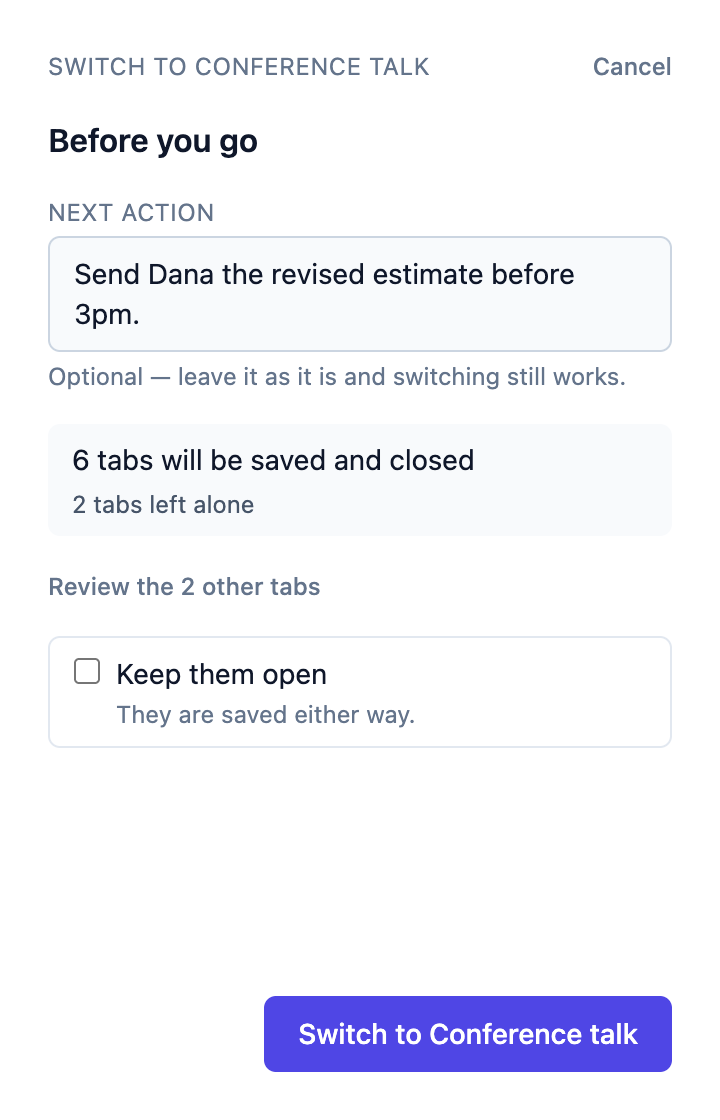
Leave without packing up
Pick where you are going. SwitchCue says what it is about to do — how many tabs it saves and closes, and how many it leaves alone — and offers you one line about where you got to. The line is optional; switching works without it.
2
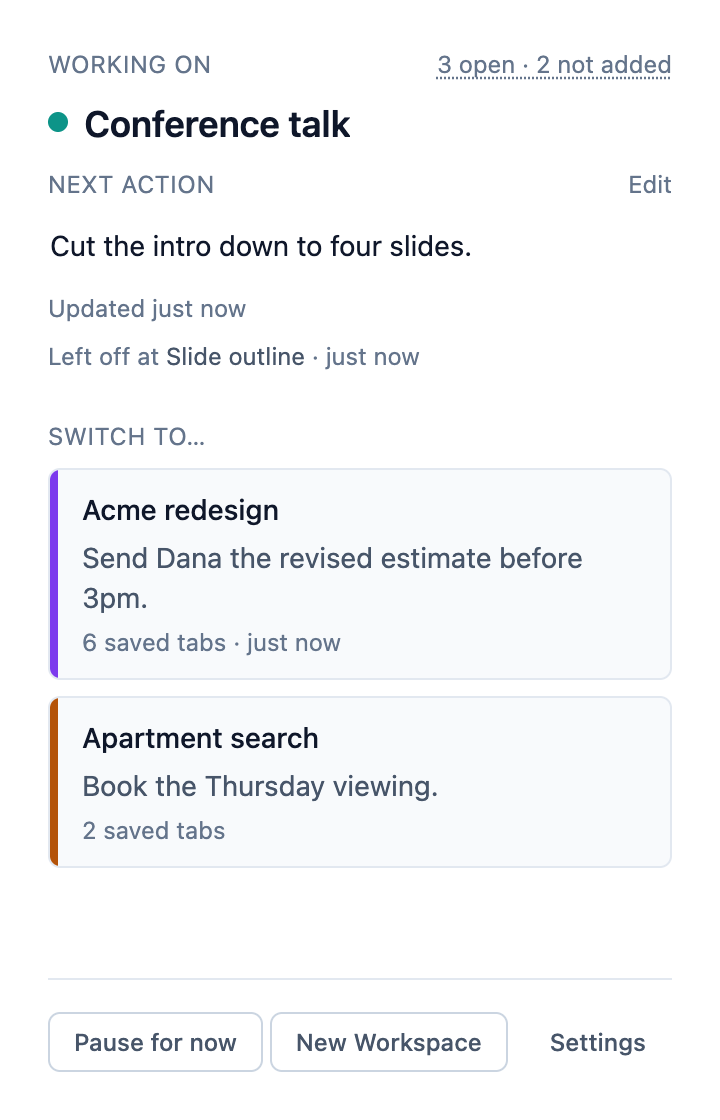
The next project is already set up
Its tabs open, its own line sits at the top, and it tells you which page you were last on. You are reading a sentence you wrote instead of working out where you were.
3
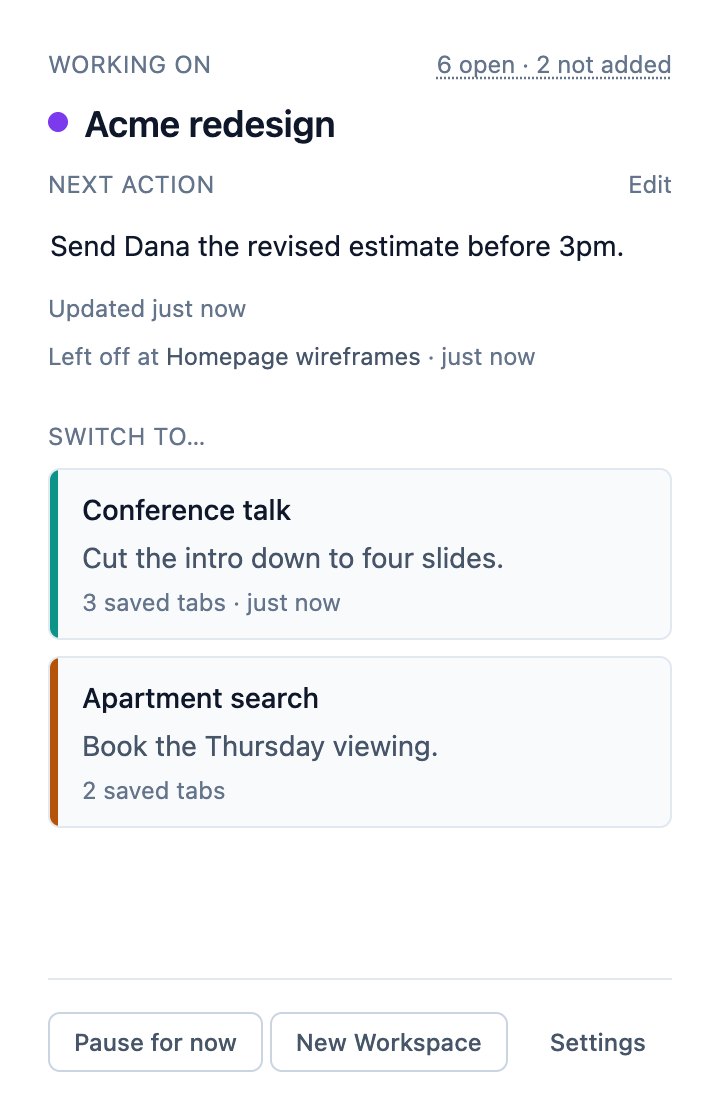
Come back to the first one
Its six tabs reopen, you land on the page you were last reading, and the note about Dana is still there. The other projects sit underneath, each with its own line, so choosing what to do next is reading rather than remembering.
4
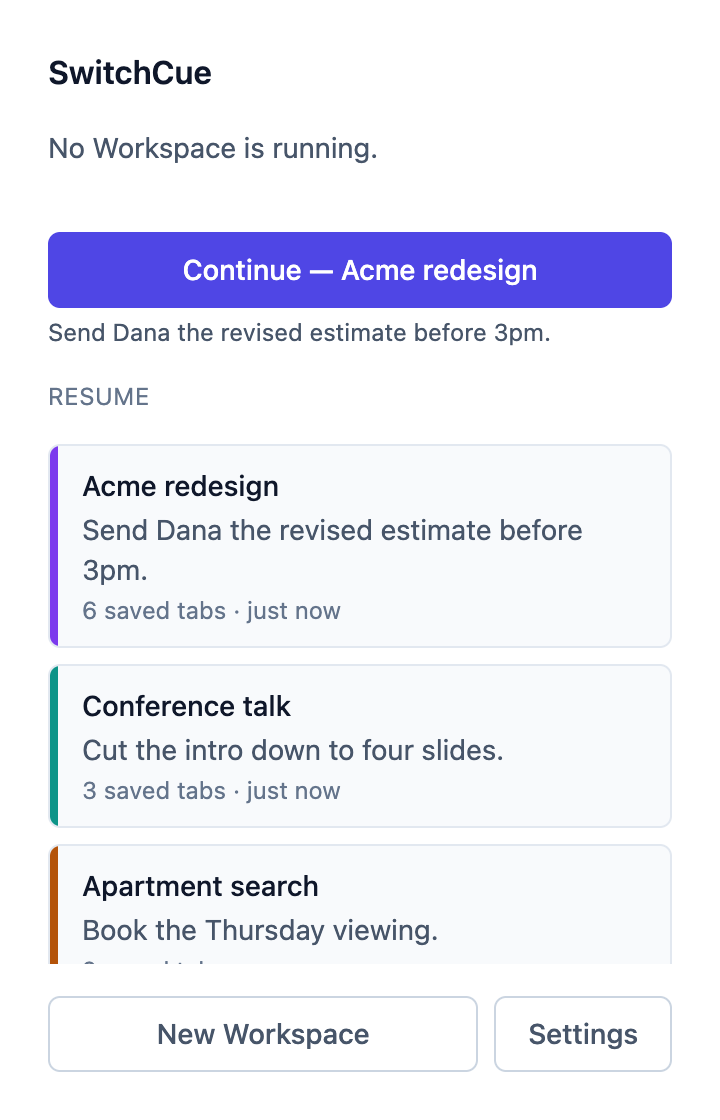
Tomorrow morning
Close Chrome for the day and SwitchCue offers back the project you were in, by name, with your line under it. It waits to be asked — nothing reopens on its own.


Before you trust it with your tabs
What SwitchCue will not do
A tool that closes tabs has to be believable about which ones, and when. These four rules are how it is built, not how it is described.
It saves your Workspace before closing its Workspace tabs
That order is the whole safety of the product. If saving does not finish, nothing closes, and the previous save is still there to come back to.
It only touches tabs you put in a project
Everything else in the window is left alone, and the panel says how many that is — before you switch, not afterwards.
One Chrome window at a time
Open the panel in a different window and it says so, then offers to move. Moving saves the project you were in first and closes none of its tabs.
It tells you what it could not reopen
Chrome does not let an extension reopen its own settings pages, the New Tab page or local files. SwitchCue says so when you try to save one, instead of losing it quietly.
The details
Small things that decide whether you keep using it
All of this is in the current build.
- Your tab groups come back
- Group titles, colours and whether a group was collapsed are all restored, and a pinned tab comes back pinned.
- A switch is four keystrokes
- Open the panel, type two letters of the project's name, press Enter twice. There is a keyboard shortcut for the panel itself, and you can change it.
- Closed a tab by mistake
- The panel says which tab left the Workspace and offers to put it back — as the same saved page, not a fresh copy of the address.
- See what a project holds
- Manage tabs lists what is open, what is saved but not open, and what is in the window but not part of this project. Add or remove from there. Removing a tab never closes it.
- Decide which new tabs join
- Three choices in Settings: nothing joins automatically, tabs opened from pages in the project join, or every tab you open while it is running joins. Whichever you pick, SwitchCue's own tabs are never swept in.
- Notes you replace are kept
- Change a Next Action and the old one is kept for that project, so you can look back or put one back in a press. You can switch the keeping off, and clear what is kept.
- Export is a real backup
- One JSON file with every project, its saved tabs and your notes. Import works into a fresh profile — which is also how you move to another computer.
- It matches your browser
- Light, dark, or whatever your system is set to.

Honest about the state of it
This is a v0.1 beta
It does the loop above, and deliberately nothing else. Here is what that means before you install it.
- Chrome 116 or later, on a desktop computer. No other browser yet.
- One Chrome window at a time, and one computer. There is no sign-in, and nothing is copied between your devices.
- Your Workspace data stays on this computer. SwitchCue does not transmit it to SwitchCue-operated servers. The full detail.
- Importing an export works into a profile with no projects in it yet, not on top of existing ones.
- Uninstalling deletes what it stored. Take an export first if you want to keep it.
Local-only, one window, one computer is a deliberate starting point rather than the end of the idea. If something is missing for the way you work, say so — a beta is the part where that still changes things.
Try it on one project
Make a Workspace from the tabs you have open right now. If it is not for you, uninstalling removes everything it stored.
Chrome Web Store listing coming soon
No account. No servers of ours — your Workspace data stays on this computer. How that works.